Choose the component type
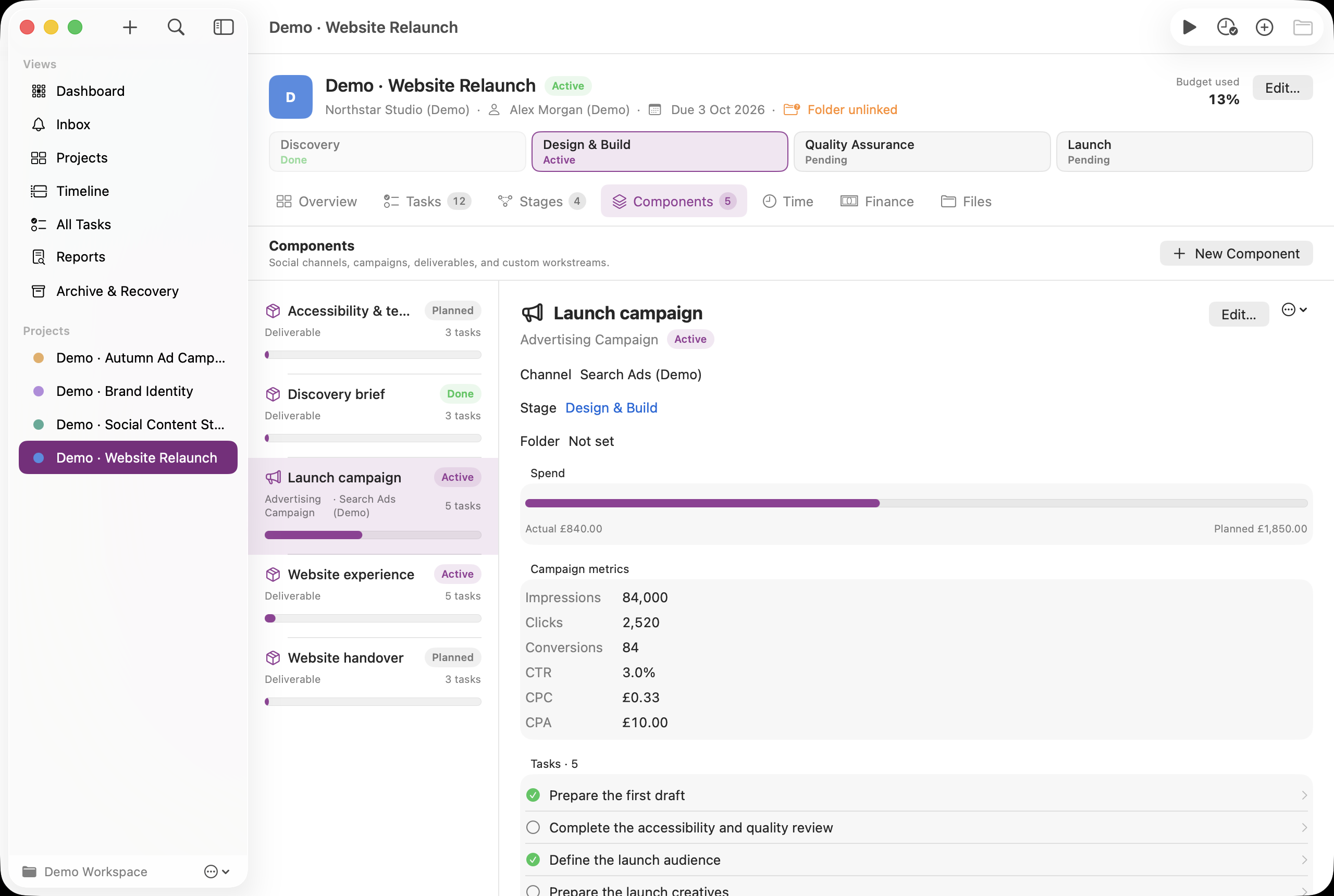
Open Components → New Component and choose Social Media or Ad Campaign. Name the channel or campaign, select the stage, set dates/status and enter Channel / platform. Social channels can record a weekly cadence; campaigns can record planned budget and manual counters.
Plan the content or campaign work
Create tasks for content, design, review or launch work and assign them to the component. Use task due dates and Calendar for your plan, and comments or attachments for copy, briefs and creative files. These tasks are planning records; the app does not publish posts or launch advertising.
Enter spend and counters
Record actual spend as Finance expenses linked to the campaign component. Edit the campaign to enter cumulative Impressions, Clicks and Conversions from the same measurement period. Replace counters with the latest totals rather than adding the same cumulative totals repeatedly.
Interpret the metrics
Campaign spend comes from linked expenses. CTR = clicks ÷ impressions; CPC = spend ÷ clicks; CPA = spend ÷ conversions. A ratio without a positive denominator has no value and is shown as unavailable. Compare the result with your source platform before exporting Campaign CSV from Reports.
See it in the app
Fictional demo data. Click an image to open the larger screenshot. Labels and dates may differ from your version.